Available both online and on-site, our instructor-led live training for Content Management Systems (CMS) provides interactive, hands-on practice in implementing a CMS to effectively create, modify, and manage website content.
These CMS training options are offered as either "online live training" or "onsite live training". Online live training (also known as "remote live training") is conducted through an interactive remote desktop session. For onsite live training, sessions can be delivered locally at your customer premises in Plovdiv or within NobleProg’s corporate training centers in Plovdiv.
NobleProg – Your Regional Training Partner
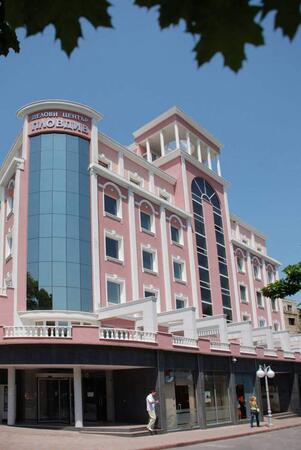
Business Center Plovdiv
Han Kubrat St 1, Plovdiv, Bulgaria, 4017
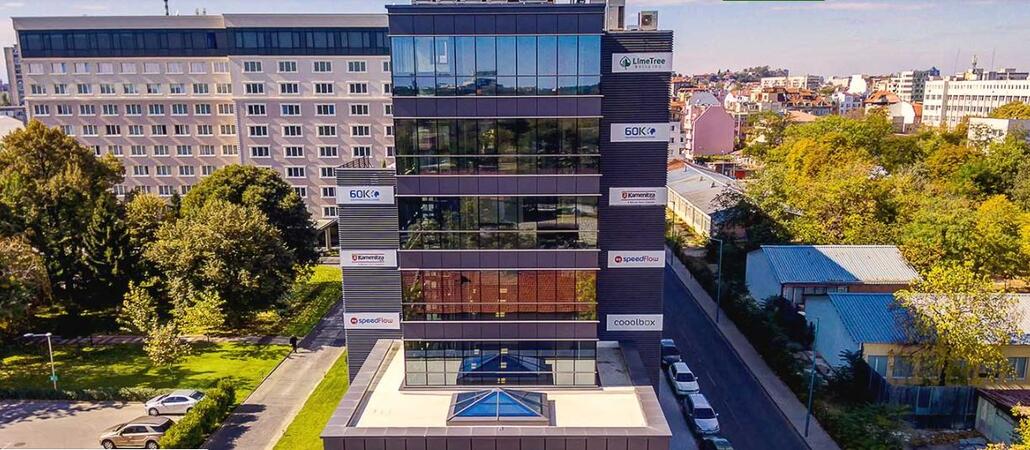
This is the most modern business center in the city, with all the necessary functionalities, while being located in a green part of the city.
It is about 20 minutes by bus from the main train station as well as the city center.
Master Drupal 10 through this 21-hour live training in Plovdiv, focusing on site creation, content supervision, and system management. Perfect for administrators and developers, the course offers practical, hands-on experience via live labs to help you build dynamic websites, integrate modules, and efficiently manage user roles.
This live, instructor-led training in Plovdiv, offered online or onsite, targets beginner-level web content managers seeking to update content, manage menus, work with taxonomy, and upload PDFs or images in Drupal.
By the conclusion of this training, participants will be capable of:
Navigating the Drupal interface and understanding its key features.
Creating and managing menus to improve site navigation.
Using taxonomy to categorize and organize content effectively.
Uploading and managing PDFs, images, and other media files.
Editing and publishing basic content pages for the library website.
This instructor-led live training, delivered in Plovdiv (online or onsite), is tailored for beginners aiming to master the essentials of Drupal 11 and gain the skills to build, manage, and customize websites.
By the end of this session, participants will be capable of:
Installing and configuring Drupal 11 in local or cloud environments.
Creating and managing content via the Drupal interface.
Customizing website design through themes.
Expanding website functionality with modules and plugins.
Comprehending user roles, permissions, and basic security protocols.
Deploying and maintaining Drupal 11 websites with confidence.
This instructor-led, live training in Plovdiv (online or onsite) is designed for beginner-level content managers who wish to learn the essential concepts, tools, and best practices for managing content using a Content Management System (CMS).
By the end of this training, participants will be able to:
Understand the key features and components of popular CMS platforms.
Create, edit, and publish content using a CMS.
Implement SEO best practices within CMS for better search engine ranking.
Manage user roles and permissions for collaboration within the CMS.
Integrate multimedia elements (images, videos, etc.) effectively within content.
Troubleshoot basic CMS issues and understand CMS security practices.
Utilize analytics tools to measure content performance.
This instructor-led, live training in Plovdiv (online or onsite) is designed for system administrators who want to set up and manage a Drupal 11 website.
Upon completion of this training, participants will be able to:
Install and configure Drupal 11.
Deploy, test, and monitor a Drupal 11 website.
Set up and manage user accounts.
Secure a Drupal 11 website.
Optimize the performance of a Drupal 11 website.
Perform scheduled backups.
Deploy multiple versions of a Drupal 11 website (multilingual, mobile, etc.).
This instructor-led live training in Plovdiv (online or onsite) is designed for developers who want to use Contentful to update content for websites or mobile applications.
Upon completion of this course, participants will be able to:
Create and configure a Contentful account.
Manage content for web and mobile apps within Contentful.
Effectively manage and update content for web or mobile applications.
This instructor-led, live training in Plovdiv (online or onsite) is designed for intermediate-level developers who want to master Drupal 10. The focus is on custom module creation, development practices, and integrating DevOps processes using Azure.
By the end of this training, participants will be able to:
Understand the core functionalities and new features of Drupal 10.
Develop custom modules tailored to business needs.
Implement best practices in Drupal development.
Configure and manage development environments using Azure services.
Automate deployment and scaling using Azure DevOps tools.
This live training in Plovdiv empowers professionals with the certification-level skills required to manage LMS platforms with efficiency. Participants gain expertise in system configuration, user management, and progress tracking through practical application and advanced reporting techniques, thereby ensuring streamlined administrative operations.
This instructor-led live training in Plovdiv (online or onsite) is aimed at beginner-level web developers, web designers, and WordPress administrators who wish to learn how to install, administer, and optimize WordPress sites. This enables them to create and manage professional and responsive websites.
By the end of this training, participants will be able to:
Understand the fundamentals of WordPress, including its features and benefits.
Install and configure WordPress on a web server.
Utilize plugins, servers, and templates to improve WordPress functionality and performance.
Create and manage custom post types in WordPress.
Create WordPress sites at basic, medium, and advanced levels.
Use Elementor to design and customize WordPress sites.
Implement site maps and breadcrumbs for WordPress sites.
Apply best practices in web and responsive design for WordPress sites.
Optimize WordPress sites for SEO and Google Analytics.
Enhance your expertise in the latest Drupal versions through this 14-hour training in Plovdiv. Gain proficiency in modern site construction, advanced architecture, and theming. Learn to configure robust entities, taxonomies, and views, making this course ideal for developers ready to build high-performance CMS platforms.
This guided training on Plovdiv delves into Magento, a premier e-commerce CMS. Learners will investigate core functionalities, architectural design, and setup methodologies, gaining proficiency in managing sales, stock, and customer data. The course also focuses on system integration, scalability, and industry trends to foster practical expertise.
This instructor-led, live training in Plovdiv (online or onsite) is aimed at beginner-level to intermediate-level web and Java developers who wish to learn how to develop and deploy custom applications on the Liferay platform.
By the end of this training, participants will be able to:
Develop custom portlets and applications using Liferay’s Plugins SDK.
Integrate Java portlets and utilize Liferay's service architecture.
Customize the portal using hooks, themes, and layout templates.
Use Liferay Developer Studio for development and deployment.
Apply best practices in Liferay development for efficient and maintainable applications.
This instructor-led, live training session in Plovdiv (online or onsite) is tailored for training coordinators, instructional designers, and HR administrators aiming to master LMS setup, user and role management, course creation, tracking, reporting, and certification preparation best practices.
This live training, led by an instructor in Plovdiv (online or on-site), is designed for developers who wish to use Magento to design and build a secure and user-friendly online shopping site.
By the end of this training, participants will be able to:
Set up the necessary development environment to start developing e-commerce sites with Magento.
Understand the architecture, core concepts, modules, and file structure in Magento.
Develop a functional and robust online store by customizing Magento components and modules.
Implement security enhancement practices in Magento to reduce vulnerabilities and potential cyber attacks.
This hands-on training in Plovdiv equips instructors with the skills to master Moodle for creating, managing, and customizing online courses. Participants will learn to design effective layouts, assign quizzes, track student progress, and facilitate engaging discussions, thereby enhancing the overall teaching experience and supporting diverse learning strategies.
This instructor-led, live training in Plovdiv (online or onsite) is aimed at developers who wish to use Shopify to design, develop, and manage extensible e-commerce applications at scale.
By the end of this training, participants will be able to:
Set up the necessary development environment to start developing Shopify apps.
Understand the features and architecture of the Shopify e-commerce platform.
Understand the fundamentals of e-commerce and how to build a business with Shopify.
Learn how to create a Shopify app using Shopify CLI, Polaris, App Bridge, and GraphQL.
Build REST APIs to extend and scale the functionalities of Shopify apps.
Get to know the tools and best practices in developing Shopify apps.
Delivered as an instructor-led live training in Plovdiv, this course explores the essential concepts and practical fundamentals of Veeva Vault. It is designed to help participants develop the hands-on skills required to manage life science documentation, track product data, and enhance collaboration across modern cloud-based content management systems.
Enrol in WordPress Training in Plovdiv to master the skills needed for building professional websites without coding. This course guides you through installation, content management, theme customization, and plugin configuration. By exploring both the .com and .org platforms, you will gain the confidence to effectively manage and maintain your own site.
Read more...
Last Updated:
Testimonials (3)
The energy the trainer had, the engagement and the willingness to assist when we got stuck
Refiloe Fifi Mupaya
Course - Introduction to Drupal 11
Lukasz demonstrated great patience and addressed all of my questions with thoroughness.
Sylvia - Intrepid Museum
Course - Master Drupal 9 Site Building / Architecture
I liked the most that the trainer was very open to questions from the participants and always did a review of what was taught across the training at the beginning of the meeting.
Online Content Management System (CMS) training in Plovdiv, CMS training courses in Plovdiv, Weekend Content Management System courses in Plovdiv, Evening CMS training in Plovdiv, Content Management System (CMS) instructor-led in Plovdiv, Content Management System one on one training in Plovdiv, Evening Content Management System courses in Plovdiv, Content Management System coaching in Plovdiv, Content Management System instructor in Plovdiv, Online CMS (Content Management System) training in Plovdiv, CMS private courses in Plovdiv, CMS instructor-led in Plovdiv, Content Management System boot camp in Plovdiv, CMS on-site in Plovdiv, Content Management System trainer in Plovdiv, CMS (Content Management System) classes in Plovdiv, Weekend CMS training in Plovdiv