Delivered either online or on-site, these instructor-led live training sessions for Adobe products provide a comprehensive learning experience. Through interactive discussions and practical exercises, participants gain insight into both introductory and advanced features of the most widely used Adobe tools.
The training is offered in two formats: "online live training" or "onsite live training." Online sessions, also known as "remote live training," utilize an interactive remote desktop connection. On-site options allow for instruction directly at your customer premises in Sofia or within NobleProg's dedicated corporate training centers in Sofia.
NobleProg -- Your Local Training Provider
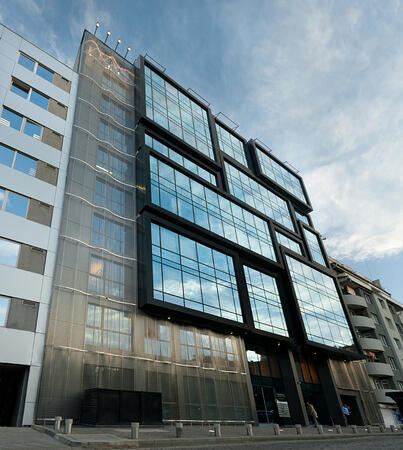
Crystal Business Center
ул. "Осогово" 40, Sofia, Bulgaria, 1303
Crystal Business Center is located in the central part of Sofia, on the corner of "Osogovo" street. and "Todor Aleksandrov" blvd. The building is easily accessible by metro (only 50 m from Opalchenska station) and other public transport. Its total area is 8000 sq.m. The office area is 6171 sq.m.
This instructor-led program on Sofia provides a comprehensive overview of Adobe Marketo Engage, covering core functionalities from campaign automation to AI-driven personalization and CRM integration. Learners will develop the practical competence required to design workflows, refine audience segmentation, and analyze performance metrics to support omnichannel strategies.
This practical training in Sofia equips faculty with Adobe Creative Cloud proficiency for academic content production. Explore Photoshop, Illustrator, InDesign, and video tools. Acquire skills in design, multimedia, and AI features to elevate institutional communication and teaching materials.
This instructor-led, live training held in Sofia delves into the essential concepts and practical foundations of Adobe Hyvä for Magento 2. It empowers participants to develop hands-on skills that are directly applicable to real-world professional settings and contemporary business requirements.
Instructor-led Adobe Express training in Sofia enables beginners to create social media graphics, flyers, and short videos. Learners will gain mastery over branding, templates, and collaboration tools to generate consistent, high-quality visual assets without requiring advanced design skills.
This instructor-led, live training in Sofia (online or on-site) is targeted at beginner to intermediate-level professionals who want to enhance their document workflows using Adobe Acrobat and AI-powered tools.
By the end of this training, participants will be able to:
Create and edit PDF documents from various sources.
Modify PDF content, including text, images, and formatting.
Use annotation and markup tools for document review.
Implement security features to protect PDF documents.
Leverage AI-powered tools to automate PDF-related tasks.
This instructor-led, live training in Sofia (online or on-site) targets graphic designers and animators at beginner to intermediate levels who wish to acquire skills in creating impressive animations, interactive media, and captivating web content using Adobe Animate.
By the conclusion of this training, participants will be capable of:
Navigating the Adobe Animate interface and its tools with confidence.
Creating and editing animations through the use of keyframes, motion tweens, and shape tweens.
Designing interactive animations and applications with ActionScript and JavaScript.
Incorporating audio and video elements into their projects.
Exporting animations for web, video, and mobile platforms.
This instructor-led, live training in Sofia (online or onsite) is aimed at beginner-level content developers who wish to have a foundational understanding of Adobe After Effects, Adobe Premiere Pro, Adobe Illustrator, Adobe Animate, and Adobe Character Animator.
By the end of this training, participants will be able to:
Understand the core functions of each software tool in the Adobe Creative Suite.
Use tools and techniques in Adobe After Effects for motion graphics, Adobe Premiere Pro for video editing, Adobe Illustrator for graphic design, Adobe Animate for animations, and Adobe Character Animator for character animation.
Improve creative design and production capabilities, enabling faster and more efficient development of high-quality digital content.
This 14-hour course in Sofia provides a comprehensive guide to creating PDFs with Adobe Acrobat, ranging from converting Office documents to advanced batch processing techniques. Learners will gain expertise in form creation, security management, and portfolio features, equipping themselves with practical skills for efficient document management in professional environments.
This 2-day instructor-led course in Sofia covers core Adobe After Effects skills, including layers, keyframing, animation control, transparency, and rendering. By the end, you will be able to competently edit professional video content using industry best practices.
This instructor-led, live training in Sofia (online or onsite) targets graphic designers and illustrators who wish to utilize advanced Adobe Illustrator tools to create professional, high-quality vector artwork, illustrations, and graphic designs.
By the conclusion of this training, participants will be able to:
Explore new and advanced features in Adobe Illustrator.
Understand tips and tricks for leveraging advanced Illustrator tools.
Convert hand sketches into digital vector images.
Create professional-level graphics, logos, and animated GIFs.
This instructor-led, live training in Sofia (online or onsite) is aimed at advanced-level creative professionals who wish to use Adobe Creative Cloud to produce advanced branded graphics, professional video content, motion assets, and integrated digital media deliverables.
By the end of this training, participants will be able to create advanced visual assets, edit and finalize professional video, build motion graphics, and streamline workflows across Adobe applications.
This instructor-led, live training in Sofia (online or onsite) is aimed at intermediate-level creative professionals who wish to use Adobe Creative Cloud to create workplace-ready graphics, video content, and digital media assets.
By the end of this training, participants will be able to: create branded assets, edit professional video, produce basic motion graphics, and work more efficiently across Adobe applications.
This instructor-led session on Sofia delves into the essential principles and practical workflows of Adobe Captivate. It empowers learners to develop competencies in crafting engaging interactive eLearning materials, ranging from capturing live demonstrations to finalizing outputs and seamlessly connecting with LMS environments.
This instructor-led, live training in Sofia offers a practical introduction to Adobe InDesign, guiding participants to master professional desktop publishing. Learn to create compelling books, brochures, and posters by efficiently managing layouts, styles, and digital assets.
This instructor-led, live training in Sofia (online or in person) is designed for anyone who wants to become a graphic designer.
Upon completion of this training, participants will be able to:
Grasp fundamental design theory and apply practical design techniques.
Utilize Adobe Creative Cloud applications effectively, such as Photoshop, Illustrator, and InDesign.
Explore alternative software options to Adobe Creative Cloud.
Become acquainted with current design trends.
Read more...
Last Updated:
Testimonials (4)
What I liked most about the training was the technical color and video performance theory session. It helped me clearly understand the reasoning behind key production decisions, such as why specific frame rates are chosen for different types of videos and how particular color spaces impact visual quality and performance. Having this theoretical foundation made the technical concepts more meaningful and easier to apply in practical scenarios.
Jason Lee
Course - Adobe Creative Cloud (After Effects, Premiere Pro, Illustrator, Animate, and Character Animator) for Beginners
Marko was very knowledgeable, friendly and explained in a very clear way. He also brought so many use cases, examples from his broad experience and was super interactive with us.
Delia Roxana Isfan-Stan
Course - Adobe Acrobat: PDF Creation and Editing
Marko’s openness to answer all our questions
Lorena Calin - BAT
Course - Adobe After Effects Essentials
I liked the part the most where we learn how to create objects.
Online Adobe training in Sofia, Adobe training courses in Sofia, Weekend Adobe courses in Sofia, Evening Adobe training in Sofia, Adobe instructor-led in Sofia, Adobe boot camp in Sofia, Adobe one on one training in Sofia, Adobe private courses in Sofia, Weekend Adobe training in Sofia, Adobe classes in Sofia, Evening Adobe courses in Sofia, Adobe on-site in Sofia, Adobe instructor-led in Sofia, Adobe coaching in Sofia, Adobe trainer in Sofia, Adobe instructor in Sofia, Online Adobe training in Sofia